Cleartext Passwords in MS Edge? In 2026?
Yup, that is for real.
For me, this started with a post in X at hxxps://x.com/intcyberdigest/status/2051406295828250963?s=61 , which highlighted research by @L1v1ng0ffTh3L4N that found exactly this issue. Edge stores all of your browser passwords in clear text, even if you haven't used them in this session, y'know, just in case.
I figured, it couldn't be that easy, right? But like so many things, yes, yes it was.
To reproduce this
- Open Edge. Don't browse anywhere, just open it
- Flip out to Task Manager, search for Edge, then expand that task
- Highlight the "browser" sub-task, right click, and choose "Create Memory Dump"
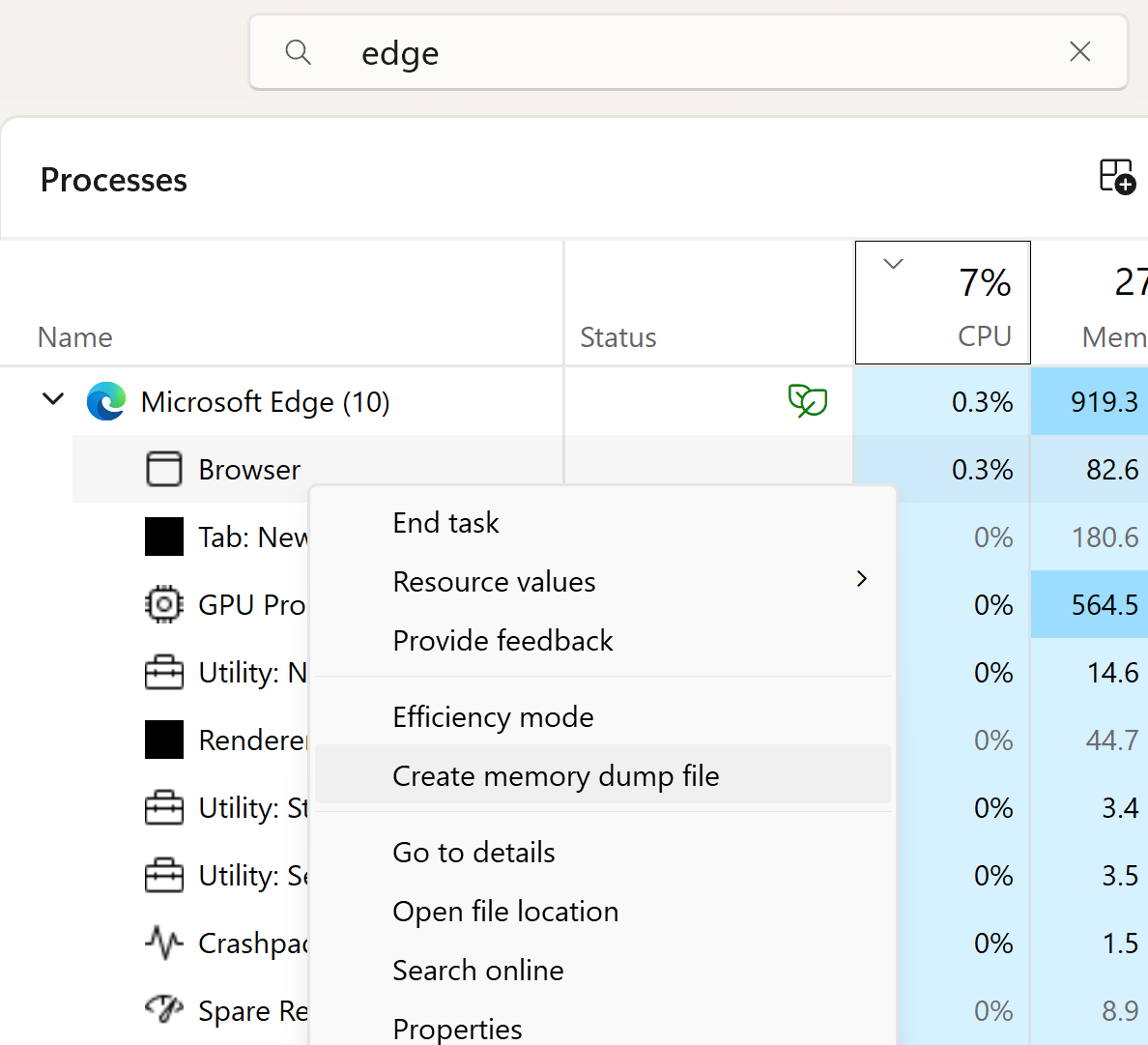
Navigate to where the DMP file is stored.
If you haven't used strings before, you're in for a treat. Strings is of course just part of most Linux distros, but you can easily get a copy for Windows as part of MS Sysinternals, at https://learn.microsoft.com/en-us/sysinternals/downloads/strings
Now let's look for passwords! You could use strings and look for known credentials, just search for a known password and you will certainly find it. Or you can take advantage of the format of the saved data:
<url of the site><protocol>< ><userid>< >password>
So, searching for "<tld><protocol>", which in most cases is "comhttps" (no spaces) will find most of them, and they'll all be in one nicely formatted group no less. The command for that will be:
strings -n 8 msedge.DMP | find "comhttps"
looking a bit down in the output (since comhttps does match more stuff in the memory dump than just the credential list), I see:
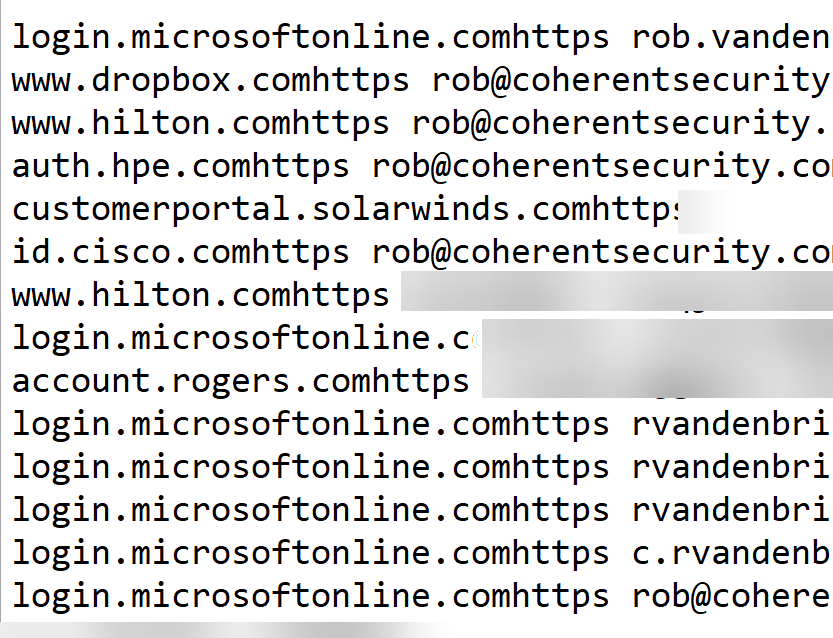
As you can see, Edge isn't my primary browser, but I do use it a fair bit for Azure work. And yes, this is a real session, so I cropped/blurred out sensitive accounts and of course passwords.
It really is that easy.
And the ironic thing? To view these same credentials in the browser, there's a whole security theatre process where Edge wants your biometrics as proof before disclosing even the userid and site names - you know, "for security". All the while, the whole shot is in clear text, free for the looking ..
Also as noted in the X post, Microsoft classifies this as "intended behaviour". I'm not sure what manager or lawyer decided that, hopefully it wasn't anyone in their security team.
Anyway, if the intent of this is to get me to use Firefox or Chrome, it's working!!
Have you seen a similar "strong front door / open window" security example in your forensics, please share in the comments (keeping any NDA's etc in mind of course)
=================
Update:
Tom Jøran Sønstebyseter Rønning (@L1v1ng0ffTh3L4N) just posted with more detail on his research at: x.com/l1v1ng0ffth3l4n/status/2051308329880719730 (follow the comment thread for all the info)
The main thrust of it remains the same. The logged in Windows user can dump all of their stored Edge credentials with no additional rights. Which means that the malware that user executes also has those credentials for the asking
===============
Rob VandenBrink
[email protected]


Comments