Treat Your Honeypot Analysis Like Code: Git, Pull Requests and a Human Gate for AI [Guest Diary]
by Kevin Truong, SANS.edu BACS Student (Version: 1)
[This is a Guest Diary by Kevin Truong, an ISC intern as part of the SANS.edu BACS program]
Introduction
When conducting analysis of honeypot activity, it's easy for it to start as a pile of terminal output. The process is manual; screenshots of the terminal, plus a text file that gets edited in a common word processing application until it is "done". There is no say whether a certain number came from a certain query, what changed between drafts, or who decided to drop a caveat.
While hosting my own honeypot sensor, I wrote up three attacks:
- An SSH brute force that logged in as mysql/mysql [1]
- A bot looking for Telegram Desktop sessions and SMS modems [2]
- A month of RedTail exploits against PHP plus one oversized multipart POST that matches the shape of PHP2Shell (CVE-2026-109618) [3].
Instead of a document folder though, I kept every report in a public git repository [4] and changed it only through pull requests. Supporting me in my analysis was an AI coding agent (Claude Code), which also drafted reports as a separate GitHub machine account. I wanted to give my Claude Code sessions a tangible identity in the code submission and review process, where a dedicated GitHub account could propose changes but never approve or merge them.
Even though I drove every part of the analysis process, the code review of each pull request marked a deliberate step in my workflow which acted as both a gate and a spot-check of the content I was producing.
This diary describes that setup, what the git history shows about how well it worked, and what I would change.
Why Do It
The question this post answers are: can version control and a mandatory human review make AI-drafted security analysis trustworthy enough to publish?
It matters for three reasons:
- Reproducibility. An indicator list or a timeline is only as good as the query behind it. If the query and its output are stored next to the claim, anyone can check it.
- Public safety. Honeypot reports contain things that must not be published: the sensor's own address, its hostname, its cloud account, and sometimes attacker material such as private keys. Once something reaches a public git history, deleting the file does not remove it [4, SECURITY.md].
- AI accountability. Language models are fluent and are confident; but fluency and confidence don't mean accuracy. If an AI is part of the workflow, there needs to be a record of what it wrote, what a human changed, and who approved it.
The Setup
The repository has one folder per attack. Each folder holds the summary, every piece of evidence it cites, and a hash list:
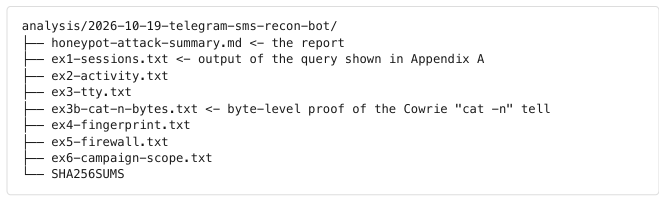
Every exhibit in a report's appendix shows the exact jq query that produced it, for example:

Before anything leaves the sensor, output is passed through a filter that replaces the sensor's address with <sensor-ip>, and then hashed. Anyone who clones the repository can confirm the evidence has not changed since it was committed:

The workflow around those files is shown in Figure 1.
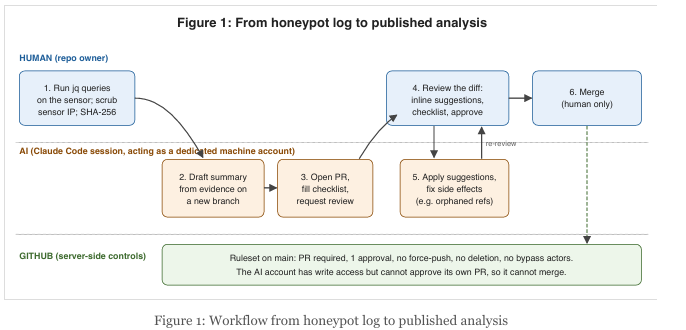
The important pieces are:
- A separate identity for the AI. Pull requests from the machine account are written by Claude Code sessions. It is a machine account I operate, and the README says so publicly [4].
- The AI can write but not merge. A GitHub ruleset on main requires a pull request with one approval, blocks force-pushes and branch deletion and has no bypass actors. The AI account has written access, but GitHub does not let an author approve their own pull request, so it can never get a change into main alone.
- A public-safety checklist on every PR. The pull request template asks the author to confirm that they read the full diff, that the secret scan is clean, that every IP and account is a placeholder (attacker indicators excepted), that there are no hostnames or local paths, and that attachments were checked by hand. The AI fills this in and I check it.
- A secret scanner before every commit. A pre-commit hook runs gitleaks locally.
Options to Close Gaps
Comparing the ruleset with my own design notes [4, homelab/change-control.md] showed where the live settings fall short:
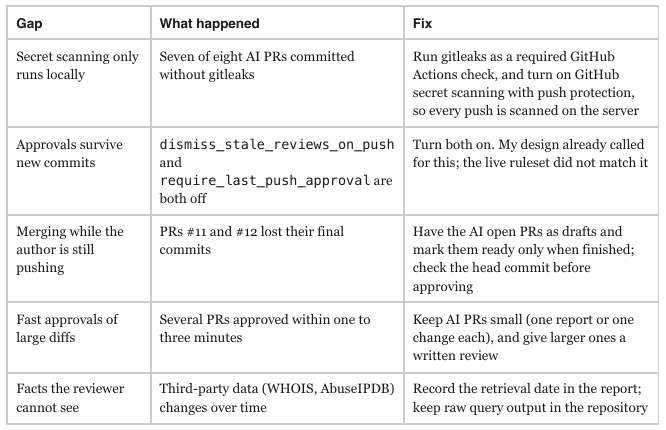
Fortunately, none of these needs’ new tools. These are repository settings and habits, which is the point. The controls that are deployed are the ones enforced by the server (GitHub), not ones written into a file the AI could edit on its own branch.
Who Benefits
- Students and new analysts get a structure that forces each claim to point at evidence, and a history that shows a reviewer how their analysis improved. This works as a solo project, but the benefits grow exponentially with multiple analysts and reviewers.
- Honeypot operators and DShield contributors can publish findings with less risk of leaking their sensor's identity, because the scrubbing and checklist happen before a merge, not after.
- Teams adopting AI assistants get a pattern they can copy: a separate identity for the AI, server-side merge controls, and a checklist that the AI must fill in honestly. The record shows exactly where the AI's work ended and a human's began.
- Readers of the reports can verify them. Every indicator traces to a query, and every query's output has a hash.
Conclusion
Version control is not new to security teams, where it's commonly seen in areas like detection rules and infrastructure code. That said though, treating something like honeypot/log analysis like code gave me reproducible evidence, a reviewable history, and a safe way to use an AI drafter: it proposed, I reviewed, and only I could merge. The history also kept me honest about the parts that did not work. Those gaps are visible because the work was in git, and each has a simple fix in the repository settings.
References
[1] Honeypot Attack Summary: SSH Brute Force from 77.239.124.204. https://github.com/kevtruo/security/tree/main/analysis/2026-10-18-ssh-brute-force-mysql-default-creds
[2] Honeypot Attack Summary: Telegram Session and SMS Modem Reconnaissance Bot. https://github.com/kevtruo/security/tree/main/analysis/2026-10-19-telegram-sms-recon-bot
[3] Honeypot Attack Summary: PHP Vulnerability Hunt, RedTail and a PHP2Shell-Pattern Request. https://github.com/kevtruo/security/tree/main/analysis/2026-10-03-php-vulnerability-hunt
[4] kevtruo/security repository (README, SECURITY.md, pull request template,homelab/change-control.md). https://github.com/kevtruo/security
[5] GitHub Docs, "About rulesets." https://docs.github.com/en/repositories/configuring-branches-and-merges-in-your-repository/managing-rulesets/about-rulesets
[6] GitHub Docs, "About push protection." https://docs.github.com/en/code-security/secret-scanning/introduction/about-push-protection
[7] gitleaks. https://github.com/gitleaks/gitleaks
[8] Claude Code GitHub Actions documentation. https://docs.anthropic.com/en/docs/claude-code/github-action
[9] https://www.sans.edu/cyber-security-programs/bachelors-degree/
-----------
Guy Bruneau IPSS Inc.
My GitHub Page
Twitter: GuyBruneau
gbruneau at isc dot sans dot edu
Java4Shell, NGINX2Shell and more: Why we are not at "Yellow"
About a month ago, we went to Infocon Yellow for the first time in a few years. We decided to address the php2shell vulnerability and alert our readers to its significant impact. Following php2shell, we had a number of vulnerabilities and events that may also have scored high enough to trigger an Infocon "Yellow" [infocon]. In the last few days, we had a major Microsoft 365 outage, a critical vulnerability in Java, and a critical vulnerability in NGINX, which was disclosed today.
My plan today was to write a bit about attacks we are seeing against one of our Java-specific honeypots. But the results can be summarized in one sentence: We are seeing many attacks, but none that exploit Java4Shell (yet). Will it be an important issue? Probably. Should you patch? Sure. Will the world as we know it end? Maybe.
So why not go to "Yellow"? This is not a new question. Often people ask why we are on "Green" if they are seeing hundreds or thousands of attacks hitting their system each day. The Internet is a dangerous place. Shouldn't we be on "Yellow" (or "Orange") to reflect that danger? My answer has been: "Green" means the Internet is broken as usual. As long as the status is "Green", you should expect a normal "9-to-5" day. I have heard from organizations that have used our infocon to justify staffing and overtime, and I am well aware of the impact it may have.
The reason behind our conservative Infocon is that you can't be alert and "on guard" all the time. An alert status that is "high" all the time is meaningless and counterproductive. You must not treat these recent vulnerabilities as "emergencies". They are the "new normal". Treat them as such. You will not be able to patch nginx2shell across a large organization before the exploit is released. Instead of trying to do the impossible and fail, think beyond the vulnerability of the day. A new reality requires new procedures and techniques. Here are a few ideas:
- Automate patching as much as possible, in particular for less critical systems. Traditionally, automatic patching had two significant drawbacks. First, you may crash a system because of a failed patch. Secondly, the patch may not be applied correctly, and you treat a vulnerable system as "patched".
Select less critical systems that would be at the end of your patch priority list. I'd rather take a system down myself than have ransomware do it for me. Having a system possibly patched is better than being sure the system isn't patched. And of course, there should be some testing, but that can wait a bit longer. This responds well to the faster development of exploits. - Reduce your exposure. This should have been a priority years ago. But there are still too many systems connected to the internet that shouldn't be connected. Build a defensible architecture. The same is true for individual applications: reduce the "blast radius" by restricting which data and resources each application can access. And reduce your supply chain exposure. Do you get enough value from tools like Optimizely to justify the risk of them compromising your application?
- Avoid chasing squirrels. Do not change your plan and drop what you are doing just because the world is going to end. The world may end, in which case, patching one more system is probably not going to make a difference. Whether the world ends or not, at least you will be well-rested to deal with it.
During my classes, I am exposed to security professionals from a wide range of backgrounds, working in different industries and countries worldwide. The one thing they all have in common is that they do not have enough time, tools, and sometimes skills to do their job. Making the job you can't do right now any more urgent won't help. Work on tooling and resources, and develop a plan for applying best practices at a sustainable pace. Embrace AI tooling. It is immensely useful for automation. It is even more amazing at helping you get organized. Many partitioners are afraid that AI will do more harm than good, and they are not wrong. But use it where it helps you most. Are you great at writing little scripts but horrible at tracking and inventorying them? Give AI the job you suck at and develop a rapport with your tools. But embracing automation does include embracing AI tooling.
Finally, I got a lot of positive feedback on the final "conclusion" of yesterday's podcast, so I am going to link to it directly here:
[php2shell] https://isc.sans.edu/diary/33440
[infocon] https://isc.sans.edu/infocon.html
--
Johannes B. Ullrich, Ph.D. , Dean of Research, SANS.edu
Twitter|

Comments